Learn How to Ruch a Simple Tee

Learn How to Ruch a Simple Tee

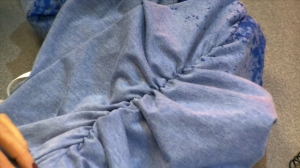
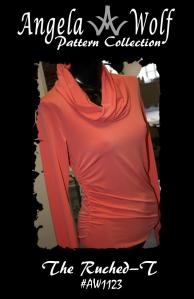
My first pattern The Ruched-T  (now available in sizes XXS – 5X and paper or downloadable :))has been out a few months now and I have really enjoyed all the emails and facebook postings from everyone wearing their new tops 🙂   A few of you have asked how I do the ruching and I thought the best way to explain is to just show you.  So I have put together a short video and of course I had to show another awesome feature on the Brother Dreamweaver XE VM6200D, the multi function foot controller.  This special foot allows you to use your feet to backstitch,  cut the thread, put the needle down, etc. and then you can keep your hands on the fabrics while sewing!  Wait until you see this one!  Anyway, enjoy ruching your tee’s and keep sending me photo’s, I love it 🙂   xoxo Angela

[youtube=http://www.youtube.com/watch?v=iXH2H-QdQNw&feature=g-upl]

Brother™ has provided me with the DreamWeaver XE, but all opinions expressed are entirely my own.

How to sew topstitching that looks professional on jeans and jackets …

How to sew topstitching that looks professional on jeans and jackets …

I hope you are all safe from hurricane Sandy and my heart goes out to all those affected.  We even experienced severe weather here in Michigan!   I made it to the beach yesterday and after getting stuck in the sand with our SUV, I was able to snap a few shots.  Unbelievable waves on Lake Michigan, over 20 footers.  I think I’ll pass on fishing for a few days 🙂

Lake Michigan during hurricane Sandy …over 20 foot seas!

Now onto sewing …. more specifically topstitching.  Topstitching jackets and jeans are not only a designer touch; this has become a main focus in today’s fashion.  The more creative the topstitching the more expensive your garment looks.  On that note, have you ever finished a great looking jacket only  to discover  you can’t find a matching color in the thick topstitching thread?  Would you like to hem your favorite jeans – again not being able to match the original jean thread color.  This video shows you an easy way to solve that problem, using two spools of Coats & Clark polyester thread and a #14 denim jean needle.  You will even get a peek at the automatic needle threader on the Brother Dreamweaver XE, yes it even works with 2 threads!  Enjoy 🙂

[youtube=http://www.youtube.com/watch?v=HtKotSXYreI&feature=plcp]

Brother™ has provided me with the DreamWeaver XE, but all opinions expressed are entirely my own.

How to Sew Designer Jean Pockets … Part 2 Adding the Coin Pocket

[youtube=http://www.youtube.com/watch?v=4OH2uiaZXyc]

Here is part 2 for finishing off the front of your designer jean pockets.  This video will show you how to add a coin pocket, which is totally optional.  Sometimes I add a logo instead, just depends what kind of mood I am in 🙂   Of course I have to show off a few other features on the Brother Dreamweaver XE VM6200D, like using the V-Sonic PenPal to determine how wide my zigzag stitch will be – you really have to see it to believe it.  Now, I just have to finalize the last of the Angela Wolf Jean Patterns so we can ship them out soon, wish me luck!  xoxo Angela

Brother™ has provided me with the DreamWeaver XE, but all opinions expressed are entirely my own

Sewing Jeans with the Brother DreamWeaver XE VM6200D

Sewing Jeans with the Brother DreamWeaver XE VM6200D

I was thrilled to take part in preview of the new V-series sewing machines from Brother.  The three new machines in this new V-series offer new technology that can really make your sewing and embroidery fun and easy … sew straight laser vision guide, v-sonic pen pal, drop light embroidery placement, just to name a few.

Since my Angela Wolf Jean Pattern’s  are  ready to launch in October, I thought it would be fun to put together some blog posts sewing my jeans to help you follow along and brag about the new Brother Dreamweaver XE VM6200D.  This machine just came out so if you are thinking of picking up a new machine, you have to check this one out.

So, I have to tell you about this sew straight laser vision light.  When I heard this, I really couldn’t imagine how this could work.  I sew all the time, how on earth can this help me sew a straight line?  First off, if you need help sewing a straight line – this feature is incredible!  For me, I usually use the foot or guide on the plate to sew straight.  I have to admit, after using the laser light for an entire day I noticed my eyes felt better (from not staring) and I was able to sit up straighter, instead of leaning over the machine.  I know your thinking, go buy glasses 🙂

Anyway, this is how this works.  The laser is shown on the main sewing screen.  Simply touch the icon and you are given a range of 10.5mm to adjust the laser position.  In the pictures below you can see the laser light on my fingers.  The lighting on this machine is so bright (perfect for sewing black fabric), I had to lower the light level to less than half to take this picture.

Brother™ has provided me with the DreamWeaverTM XE, but all opinions expressed are entirely my own.

Testing Brother’s PE-Design Next for Custom Embroidery

Testing Brother’s PE-Design Next for Custom Embroidery

[youtube=http://www.youtube.com/watch?v=GgTcMOhtlCk&context=C4c6673eADvjVQa1PpcFODx7nLiq6DH_2CPj4HCzz1QByuUKW2TV8=]

I have been putting off trying this software out for the simple fact I don’t have the time to learn an entire new program.  Little did I know that in less than 30 minutes I would have custom embroidery at my fingertips!  This software is so easy to use, the navigation, the titles, the options, etc.    That’s why I am sharing this quick video with you, just in case you are thinking of upgrading to Brother’s PE-Design Next software, it is totally worth it.

Now I have all weekend to create new designs, can’t wait!  I even noticed I can upload a picture for embroidery, that’s a little scary LOL!  Although, I have some cute pictures from my nephew’s 1 and 2 year birthday party last weekend with lot’s of colorful cake.  I wonder how many colors of embroidery thread I am going to need for this?

Cody turns 1

The Angela Wolf  logo gets an upgrade :)

Pin It on Pinterest